Building an Enterprise Serverless Platform with Terraform: Architecture, Validation, and Real-World Implementation

AWS Solutions Architect Associate | CCNP Enterprise Core | Cloud Security Specialist I build secure, scalable cloud infrastructure and document my journey from AWS console expertise to Infrastructure as Code mastery. Sharing my learning path with Terraform, AWS services, and cloud security best practices. Currently converting my console projects to automated Terraform deployments while deepening my cloud architecture skills.
The Learning Path That Led Here
Before diving into this project, I built a foundation through four previous projects. I started with manual AWS implementations, building a 3-tier architecture step by step through the console, then a serverless application with Lambda and DynamoDB. These manual projects taught me how AWS services actually work and connect together.
Next, I learned Terraform by going through tutorials and reading the official documentation and white papers to understand Infrastructure as Code principles. After building that foundation, I committed to a structured 10-day hands-on curriculum where I practiced daily with AWS services, documenting each session with screenshots and notes. Then I automated my 3-tier architecture with 57 resources across 6 modules, implementing CI/CD with GitHub Actions.
An important part of my learning process was sharing projects publicly and gathering feedback. After posting each project on LinkedIn, I collected feedback from experienced professionals in the comments. I took detailed notes of every suggestion and applied those learnings to my next project. This feedback loop helped me improve continuously, incorporating real-world insights from people already working in the field.
That progression brought me to this project, an enterprise serverless platform that combines everything I learned about AWS, Terraform, security, compliance, and validation workflows, along with all the feedback I received from the community.
The Project: Enterprise AWS Serverless IaC Platform
This project implements a complete serverless application using 30 AWS resources organized into 7 Terraform modules. It is a blog and portfolio platform with authentication, data persistence, monitoring, compliance checking, and drift detection.
What made this project special was the validation approach. I architected everything using local validation techniques to prove the infrastructure works without deployment costs. I used SAM CLI to test Lambda functions locally, ran frontend builds and tests on my machine, validated all Terraform configurations with terraform plan and terraform validate, used tflint to check Terraform best practices and catch configuration issues early, and linted YAML files before pushing workflows to catch syntax errors.
Repository: Enterprise AWS Serverless IaC Platform
Architecture Overview
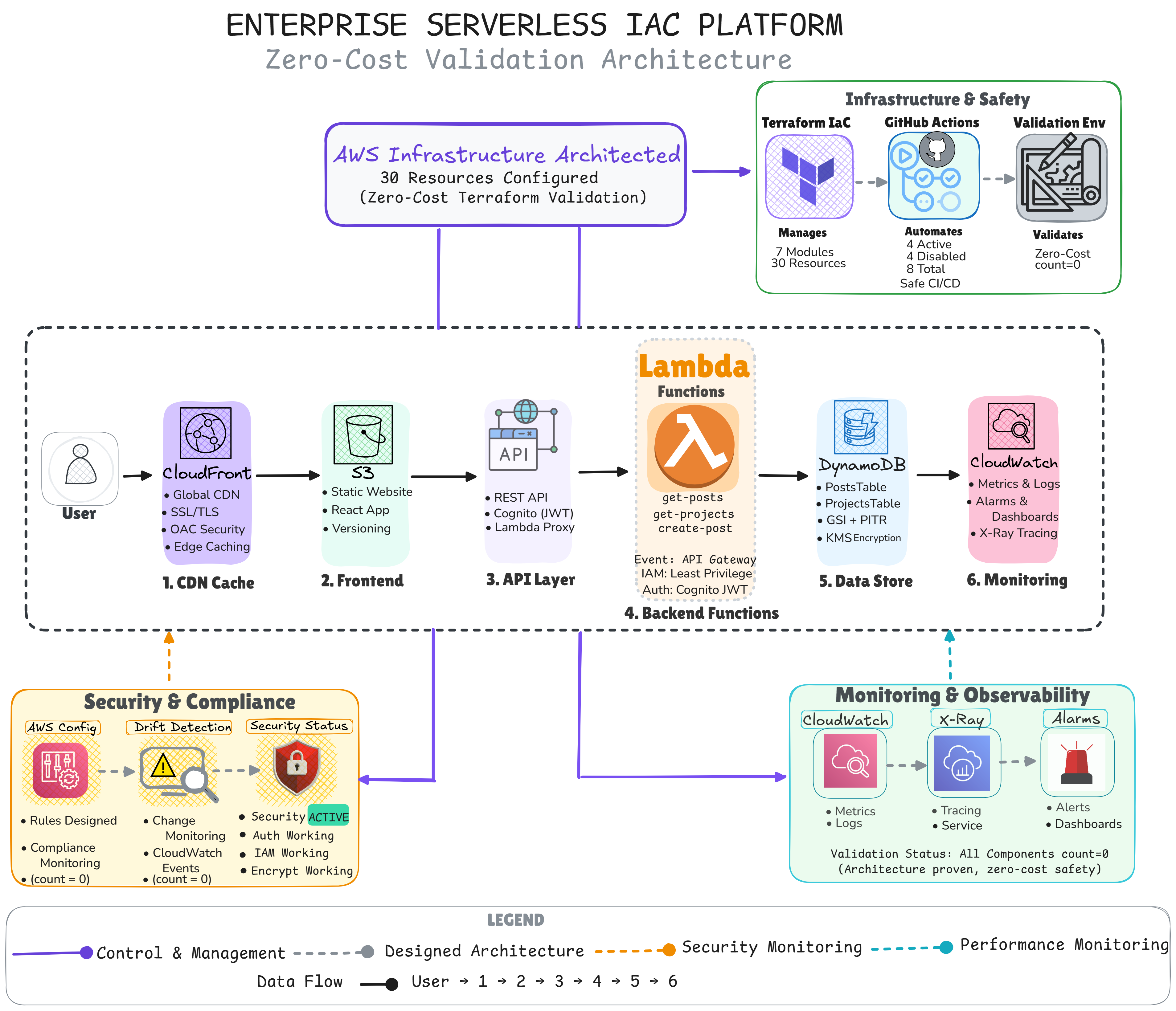
Let me walk through this architecture from top to bottom, explaining how everything connects and why it is designed this way.
Infrastructure and Safety Pipeline
At the top of the diagram, you see the core infrastructure management layer. This is where Terraform manages all 30 AWS resources through 7 modular components. The Terraform configuration connects to GitHub Actions for automated validation and to a validation environment that tests everything without deployment.
GitHub Actions runs 4 active workflows that continuously validate the infrastructure. Terraform validation checks syntax and configuration. Security scanning looks for vulnerabilities. Frontend build testing ensures the React application compiles. Drift detection monitors for configuration changes. There are 4 additional workflows for deployment, but these remain disabled with manual triggers only, ensuring nothing deploys accidentally.
The validation environment uses Terraform's count parameter set to zero for every resource. This means terraform plan shows exactly what would be created, proving the configuration is correct, but no actual AWS resources exist yet.
The Application Flow
Now let me trace the path a user takes through the application.
Step 1: CloudFront CDN
When a user visits the application, their request first hits CloudFront, Amazon's global content delivery network. CloudFront handles SSL/TLS encryption, provides Origin Access Control for security, and caches content at edge locations worldwide for fast delivery no matter where users are located.
Step 2: S3 Frontend
CloudFront retrieves the actual website files from S3, where the React single-page application is hosted. S3 provides versioning so we can roll back if needed, and it serves as the origin for CloudFront's distribution. The React app handles all the user interface and client-side logic.
Step 3: API Gateway
When users interact with the application, the React frontend calls API Gateway. This is the entry point for the backend. API Gateway handles REST API endpoints, validates authentication using Cognito JWT tokens, and routes requests to the appropriate Lambda functions through proxy integration.
Step 4: Lambda Functions
Three Lambda functions power the backend logic:
The get-posts function retrieves blog posts from DynamoDB and returns them to the frontend. The get-projects function retrieves portfolio projects. The create-post function allows authenticated users to create new blog posts.
Each function is configured with least privilege IAM roles, meaning they only have permissions for exactly what they need to do. All functions are triggered by API Gateway and authenticated through Cognito JWT tokens.
Step 5: DynamoDB Tables
The Lambda functions read from and write to two DynamoDB tables. The PostsTable stores blog content with titles, descriptions, and metadata. The ProjectsTable stores portfolio projects with skills, links, and descriptions.
Both tables use Global Secondary Indexes for flexible query patterns, Point-in-Time Recovery for backup protection, and KMS encryption for data security. DynamoDB's serverless nature means it scales automatically with demand.
Step 6: CloudWatch Monitoring
Everything flows into CloudWatch for observability. CloudWatch collects metrics from all services, stores logs from Lambda functions, triggers alarms when error rates or latency exceed thresholds, and provides dashboards for visualizing system health. X-Ray tracing tracks requests through the entire system, showing where time is spent and where bottlenecks occur.
Security and Compliance Layer
Below the main application flow, you see the security and compliance components.
AWS Config continuously monitors resources against security rules. These rules check things like whether Lambda functions are publicly accessible, whether DynamoDB has point-in-time recovery enabled, whether API Gateway has logging configured, and whether S3 buckets allow public read access. Config provides compliance monitoring that runs automatically.
The drift detection system monitors for infrastructure changes. If someone manually modifies a resource that should be managed by Terraform, drift detection catches it. This system uses CloudWatch Events to trigger when resources change, and it can send notifications when drift is detected.
Security patterns are implemented throughout the main application flow. IAM least privilege, encryption at rest and in transit, authentication requirements, and access controls are built into the architecture, not added later.
Monitoring and Observability
On the right side, you see the monitoring and observability stack.
CloudWatch collects metrics and logs from every service. X-Ray provides distributed tracing, creating service maps that show how requests flow through the system. Alarms trigger when metrics cross thresholds, sending alerts through configured notification channels.
This observability layer ensures you know what the system is doing, can diagnose problems when they occur, and have the data needed to optimize performance.
Technical Implementation Details
The Terraform Modules
The infrastructure is organized into seven Terraform modules, each handling a specific concern:
The API module manages API Gateway and Lambda functions. The auth module handles Cognito user pools and identity pools. The database module creates DynamoDB tables. The storage module configures S3 buckets and CloudFront distributions. The monitoring module sets up CloudWatch dashboards, alarms, and X-Ray tracing. The compliance module implements AWS Config rules. The drift detection module creates the change monitoring system.
This modular approach means each component is self-contained, reusable, and testable independently.
The Validation Methodology
Every resource in this project uses the count parameter:
resource "aws_lambda_function" "get_posts" {
  count = 0

  function_name = "serverless-blog-get-posts"
  runtime       = "nodejs18.x"
  handler       = "index.handler"
  role          = aws_iam_role.lambda_role[0].arn

  # Complete configuration continues
}
When count equals zero, Terraform validates the resource configuration completely but does not create it. Running terraform plan shows output like this:
Plan: 0 to add, 0 to change, 0 to destroy.

Note: You didn't use the -out option to save this plan, so Terraform
can't guarantee to take exactly these actions if you run terraform apply now.
But the plan output shows all 30 resources with their complete configurations, proving they would work if deployed. This approach lets me test infrastructure thoroughly before committing to deployment.
To verify the infrastructure is actually deployment-ready, I tested with count set to 1. I changed the count parameter, ran terraform plan, captured screenshots showing all 30 resources ready for creation, then reverted back to count 0. The repository includes both versions: main.tf with count 0 for validation mode, and main.tf.with-count-1 showing the deployment-ready configuration with screenshots proving it works. This demonstrates the architecture is not theoretical, it is tested and ready to deploy when needed.
The CI/CD Safety System
GitHub Actions workflows validate everything automatically. The terraform-validation workflow runs on every push, checking syntax with terraform validate and generating plans to verify configurations. The security-scan workflow uses tools to check for common vulnerabilities and misconfigurations. The frontend-build workflow ensures the React application compiles successfully. The drift-detection workflow simulates the change monitoring system.
Before pushing any workflow changes, I use YAML linting locally to catch syntax errors early. GitHub Actions workflows are YAML files, and small syntax mistakes can break entire pipelines. Running a YAML linter before committing catches issues like incorrect indentation, missing colons, or invalid structure before they reach GitHub. This local validation step saved me from multiple failed pipeline runs and taught me to validate locally before pushing changes.
Four additional workflows exist for actual deployment: serverless-deploy, frontend-deploy, terraform-apply, and infrastructure-promote. These workflows are disabled in the repository and configured to require manual approval if ever enabled. This prevents accidental deployments.
Local Development and Testing
Beyond Terraform validation, I can test the application locally. SAM CLI allows running Lambda functions on my machine without deploying them to AWS. I can invoke functions, pass test events, and see responses exactly as they would behave in production.
The frontend development server runs React locally with hot reloading, letting me develop and test the user interface without any cloud resources. Integration between frontend and backend can be validated through SAM's local API Gateway simulation.
The Documentation Process
Throughout this project, I documented everything with screenshots. Not just successes, but the entire development process including errors and how I resolved them.
I have 46 screenshots organized into categories. Eleven show CI/CD workflow development and validation. Twelve capture Terraform configuration errors and their fixes. Five prove successful infrastructure validation. Five document backend Lambda testing. Six show frontend development challenges. Three demonstrate SAM CLI local testing. One compares error states before and after resolution.
This documentation serves two purposes. It provides evidence of actual work, showing I encountered and solved real problems. And it demonstrates the problem-solving process, which is often more valuable than just showing finished results.
What This Project Demonstrates
Technical Skills
This project shows proficiency with AWS serverless services including Lambda, API Gateway, DynamoDB, S3, CloudFront, Cognito, CloudWatch, and X-Ray. It demonstrates Infrastructure as Code capabilities with Terraform including module design, state management, and validation workflows. It shows CI/CD implementation with GitHub Actions and local development practices with SAM CLI.
Professional Practices
Beyond technical skills, this project demonstrates professional engineering practices. Security and compliance are built in from the start, not added later. Monitoring and observability are first-class concerns. Documentation is thorough and honest. Safety mechanisms prevent accidental changes. The validation approach proves infrastructure works before deployment.
Problem-Solving Approach
The 46 documented troubleshooting scenarios show systematic problem solving. When errors occur, I understand the message, identify the root cause, implement a fix, verify the solution works, and document what happened. This process is visible throughout the screenshot collection.
Real-World Application
While this project uses validation mode with count set to zero, it is production-ready. Changing count from 0 to 1 in the Terraform configurations and enabling the deployment workflows would create the actual infrastructure in AWS.
The architecture follows AWS best practices. Resources use least privilege IAM policies. Data is encrypted at rest and in transit. The serverless approach scales automatically with demand. Monitoring provides visibility into system health. Compliance checking ensures security rules are followed.
This is not a toy project or a tutorial copy. It is a complete, working architecture that could serve real users if deployed.
What This Journey Taught Me
This project represents the culmination of my cloud learning journey so far. From manual console operations to enterprise Infrastructure as Code. From learning individual services to architecting complete systems. From building without much structure to implementing security, compliance, and monitoring from the start.
The progression was not linear. Each project taught me something that changed how I approached the next one. Manual implementations taught me services deeply. Terraform learning taught me automation principles. The 3-tier project taught me to validate before deploying. This serverless project brought everything together.
More importantly, sharing projects publicly and gathering feedback created a continuous improvement loop. Real world insights from experienced engineers shaped how I built each successive project. That feedback loop was as valuable as the technical learning itself.
For Other Learners
If you are learning cloud infrastructure, this repository demonstrates one approach. The validation methodology lets you test infrastructure without deployment costs. The modular Terraform design shows how to organize complex systems. The documentation illustrates how to capture your learning process honestly.
Feel free to explore the code, review the documentation, and adapt any approaches that work for your learning journey. The repository is public and meant to be educational.
Connect With Me
If you found this project interesting or want to discuss cloud architecture, feel free to connect.
GitHub: github.com/Sabin-Rana
LinkedIn: linkedin.com/in/sabin-rana
Blog: sabinrana.hashnode.dev
Certifications: Credly Profile
Thank you for reading about this project. I hope the architecture explanation was clear and the approach useful.


